
You can not select more than 25 topics
Topics must start with a letter or number, can include dashes ('-') and can be up to 35 characters long.
 wxc
fb62116df8
wxc
fb62116df8
|
1 year ago | |
|---|---|---|
| api | 1 year ago | |
| common | 1 year ago | |
| components | 1 year ago | |
| hybrid/html | 1 year ago | |
| pages | 1 year ago | |
| platforms/app-plus | 1 year ago | |
| static | 1 year ago | |
| store | 1 year ago | |
| uni_modules | 1 year ago | |
| wxcomponents/vant | 1 year ago | |
| .gitignore | 1 year ago | |
| App.vue | 1 year ago | |
| README.md | 1 year ago | |
| changelog.md | 1 year ago | |
| index.html | 1 year ago | |
| jest.config.js | 1 year ago | |
| main.js | 1 year ago | |
| manifest.json | 1 year ago | |
| package.json | 1 year ago | |
| pages.json | 1 year ago | |
| template.h5.html | 1 year ago | |
| uni.scss | 1 year ago | |
README.md
hello-uniapp
uni-app框架示例,一套代码,同时发行到iOS、Android、H5、小程序等多个平台,请使用手机在下方扫码快速体验uni-app的强大功能。官方文档
快速上手
hello-uniapp 示例工程可以通过两种方式创建, 一种是 HBuilderX, 配套 IDE,集成开发;另一种是 CLI 创建;推荐前者。
通过 HBuilderX 可视化界面创建(推荐)
可视化的方式比较简单,HBuilderX内置相关环境,开箱即用,无需配置nodejs。
开始之前,开发者需先下载安装如下工具:
- HBuilderX:官方IDE下载地址
HBuilderX是通用的前端开发工具,但为uni-app做了特别强化,请下载App开发版。
由于截图在 github 不便浏览,参见官方文档 HBuilderX 可视化界面创建
通过 vue-cli 创建
npm install -g @vue/cli
创建uni-app
使用正式版(对应HBuilderX最新正式版)
vue create -p dcloudio/uni-preset-vue my-project
使用alpha版(对应HBuilderX最新alpha版)
vue create -p dcloudio/uni-preset-vue#alpha my-alpha-project
此时,会提示选择项目模板,选择 hello uni-app 项目模板,如下所示:
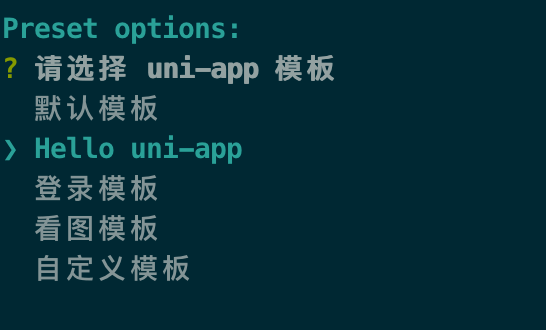
创建好后,进入项目目录
cd my-project
执行该命令运行到 h5 端
npm run dev:h5
欢迎提 issues,推荐到官方社区提问。
扫码体验
一套代码编到10个平台,这不是梦想。眼见为实,扫描10个二维码,亲自体验最全面的跨平台效果!










注:某些平台不能提交简单demo,故补充了一些其他功能;hello uni-app示例代码可从[github](https://github.com/dcloudio/hello-uniapp)获取
快应用仅支持 vivo 、oppo、华为
360小程序仅 windows平台支持,需要在360浏览器中打开
uni-app官网文档详见https://uniapp.dcloud.io
更多uni-app的模板、示例详见插件市场